 Danny Chepenko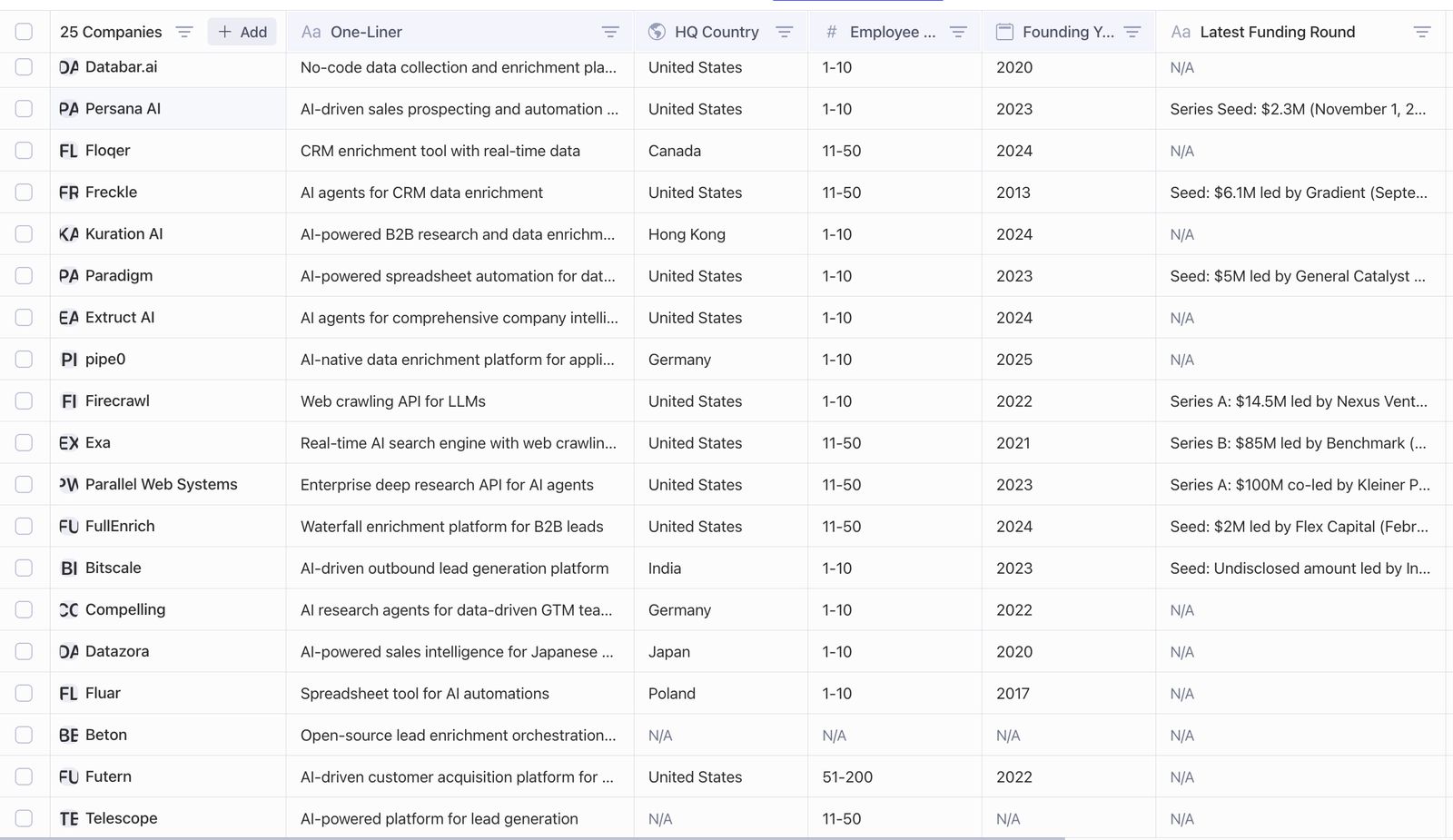
Everyone knows Clay; many learned it through agencies; most agree the yield can be powerful; and yet, teams still feel a persistent gap between "what the platform could do" and "what our teams can reliably operate day‑to‑day."
The funny thing is: Clay is hard to define. It's part orchestration, part database, part workflow, and part… religion. That breadth is the point—and also the opening. When a tool spans so many jobs-to-be-done, it invites specialists to peel off slices and win with focus.
This piece reframes the landscape for decision‑makers evaluating alternatives: where the market is splitting, how to run a low‑risk pilot, and which metrics predict ROI.
A simple framework: nine splits you'll encounter
1) Cost positioning
Lower-cost pipelines that produce similar outcomes for budget‑constrained teams. The bet: keep outcomes, remove overhead.
When this matters: Teams with high volume needs but limited budgets, or organizations where Clay's credit costs scale unpredictably with usage.
Key questions to ask:
- What's the true cost per enriched record at your volume?
- Are there hidden costs beyond the base subscription?
- How does pricing scale as your team grows?
Examples: Beton (open-source, free with vendor API keys), Fluar (pay-per-use pricing model), pipe0 (free trial with 20 credits)
2) Data coverage positioning
Deeper regional or vertical datasets where mainstream sources are weak or non‑compliant. The bet: coverage quality beats generality.
When this matters: Teams operating in specific geographic markets, niche industries, or compliance-sensitive regions where Clay's general-purpose data sources fall short.
Key questions to ask:
- What's your primary geographic focus?
- Do you need industry-specific data that general sources miss?
- Are there compliance requirements (GDPR, CCPA) that affect data sourcing?
Examples: Datazora (Japan-specific corporate research with Salesforce AppExchange integration)
3) CRM‑native enrichment
Do enrichment, dedupe, and scoring inside the CRM to reduce context switching and API sprawl. The bet: operators want fewer hops.
When this matters: Teams that live primarily in their CRM and want to eliminate the back-and-forth between Clay and Salesforce, HubSpot, or other platforms.
Key questions to ask:
- How much time do your operators spend switching between tools?
- Would native CRM integration reduce training overhead?
- Are you paying for multiple tools that could be consolidated?
Examples: Freckle (AI data enrichment native to HubSpot), Floqer (CRM enrichment with real-time data), Persana AI (CRM integration with AI-powered insights)
4) Non‑GTM positioning
Apply Clay‑like primitives to recruiting, research, internal ops. The bet: the workflow pattern is transferable beyond sales/marketing.
When this matters: Organizations looking to apply data enrichment and workflow automation to use cases beyond sales and marketing—recruiting, market research, competitive intelligence, or internal operations.
Key questions to ask:
- Do you have use cases outside of GTM that need similar automation?
- Would a more flexible platform serve multiple teams?
- Are you currently using Clay for non-GTM work where it feels like a mismatch?
Examples: Extruct (AI platform for company research automation), Compelling (AI research agents for GTM teams), Kuration AI (B2B research and M&A intelligence), Paradigm AI (spreadsheet-based data processing)
5) API infrastructure
Developer‑first enrichment/retrieval/pipeline APIs—"sell the pipes, not the house." The bet: composability and latency/SLAs matter.
When this matters: Technical teams building custom applications, integrations, or internal tools that need reliable, low-latency data APIs rather than a full platform.
Key questions to ask:
- Do you have developers who can build custom integrations?
- Is latency or uptime critical for your use case?
- Would you prefer to own the integration layer rather than depend on a platform?
Examples: Parallel (enterprise deep research API), Firecrawl (web crawling API for LLMs), Exa (web search and crawling API), Linkup (AI search engine API)
6) Open source / self‑hosted
Community‑driven stacks for privacy, customization, and cost predictability. The bet: control and data gravity win in certain segments.
When this matters: Organizations with strict data privacy requirements, need for customization, or desire to avoid vendor lock-in and predictable long-term costs.
Key questions to ask:
- Do you have compliance requirements that mandate data residency?
- Do you need customizations that commercial platforms don't support?
- Is cost predictability more important than convenience?
Examples: Beton (MIT-licensed self-hosted lead enrichment), Firecrawl (open-source web scraping)
7) Email "waterfall" engines
Stack multiple enrichment providers with cascading logic and deliverability safeguards. The bet: quality via aggregation and policy.
When this matters: Teams where email deliverability and data quality are mission-critical, and you want redundancy across multiple data sources.
Key questions to ask:
- How important is email deliverability to your operations?
- Would aggregating multiple data sources improve accuracy?
- Do you need sophisticated fallback logic when primary sources fail?
Examples: FullEnrich (waterfall enrichment with 20+ data sources and 80%+ find rate)
8) Conversational list building
Chat to build lists → push to sheets/CRMs. The bet: speed to first list and operator UX beats raw flexibility.
When this matters: Teams where ease of use and speed to value matter more than advanced workflow capabilities, or where non-technical operators need to build lists without training.
Key questions to ask:
- How technical are your operators?
- Is speed to first result more important than advanced features?
- Would a simpler interface reduce training time?
Examples: Telescope (natural language search for prospecting), Leadsforge (chat-like interface for lead generation)
9) Pure orchestration
Workflow engines with neutral data models; connect services without prescribing where data lives. The bet: keep the layer thin and reliable.
When this matters: Teams that already have preferred data sources and tools but need workflow automation to connect them, without being locked into a specific data vendor.
Key questions to ask:
- Do you already have preferred data sources?
- Do you need workflow automation more than data enrichment?
- Would you prefer to keep your data layer separate from your orchestration layer?
Examples: Databar.ai (no-code data collection and enrichment), pipe0 (AI-native data enrichment platform), Bitscale (lead generation orchestration), Futern (customer acquisition platform), Jeeva AI (sales automation platform), Prospexs (AI-powered lead matching engine)
When to stick with Clay
Clay remains the right choice if:
- Your team is already productive and trained on the platform
- Your use cases span multiple categories (enrichment + orchestration + database)
- You value the ecosystem and community around Clay
- The cost is acceptable relative to the outcomes you're achieving
- You need the flexibility to pivot workflows quickly
When to explore alternatives
Consider alternatives if:
- Cost is scaling unpredictably with your volume
- You have specific data coverage gaps that Clay can't address
- Your team struggles with Clay's complexity
- You need deeper CRM integration than Clay provides
- You have use cases outside of GTM that Clay doesn't serve well
- You need developer-friendly APIs for custom integrations
Conclusion
The market for Clay alternatives isn't about finding a "Clay killer"—it's about finding the right tool for your specific constraints, use cases, and team. The nine splits we've outlined represent different strategic bets that specialized tools are making.
Your job as a decision-maker isn't to find the perfect tool, but to find the tool that best fits your context. That might be Clay. It might be one of these alternatives. Or it might be a combination of tools that each excel in their domain.