 Danny Chepenko
A few weeks ago we open-sourced gtm-skills, our Claude Code setup for the first half of go-to-market: list building, email generation, campaign sending. Outbound.
Today we're releasing the second drop: gtm-cowork-skills. Nine skills for what happens after the meeting is booked. Meeting prep, post-call MEDDPICC updates, account plans, org charts, re-engagement, pipeline review. Deal execution.
Two repos, two halves of GTM, both in the open.
github.com/extruct-ai/gtm-cowork-skills
Same skills, different surface
Cowork and Claude Code run on the same model and the same skills system. The nine skills in this repo work in either.
The cut is audience. Claude Code is terminal-first. Skills are files in a repo, connectors are /mcp add lines, schedules are cron entries. That fits GTM engineers running outbound pipelines, which is why our first repo gtm-skills lives there.
Deal execution has a different shape. The person doing the work is an AE. The edit loop matters more than version control. The connector catalog needs to open with a button, not a JSON file. The skill you just rewrote needs to run by the end of the next meeting.
That's what Cowork's packaging buys for deal work:
- GUI skill management. Toggle skills in the Customize panel, edit one by asking Claude to edit it, upload a ZIP to install a new one. Claude Code's equivalent is editing
.claude/skills/files and running/pluginfrom the CLI. - One-click OAuth for connectors. Gmail, Calendar, Slack, Stripe, Intercom toggle on from Settings → Integrations and authorize in a modal. Claude Code supports the same catalog through
/mcp addor a.mcp.json. - A workflow surface, not a pipeline runner. The customize panel, the marketplace, the cadence UI, all shaped around reactive work on an AE's calendar rather than batch runs a GTM engineer wires up in a repo.
A capability-gap argument used to make sense. Cowork launched in January with scheduled tasks, parallel agents, live connectors, and a skill creator that Claude Code didn't have. Anthropic backported most of it by April: desktop scheduled tasks in March, cloud Routines last week, native worktrees, the shared Chrome extension. The gap today is packaging, not features.
One asymmetry the other way: Claude Code Routines run on Anthropic's cloud and keep going when your laptop is closed. Cowork's schedules run locally. For deal work local is usually fine. Your laptop is open while you sell, and the data never leaves your stack. For anything that needs to fire overnight, push it to Routines.
We still reach for Cowork for deal work because the edit loop fits the shape of reactive selling. A meeting at 2pm where prep needs to land by 1:45. A call that ends at 3pm with MEDDPICC due by EOD. A stakeholder who's gone quiet for ten days and you want to hear about it on day eleven. Open a skill, tweak the prompt in plain English, re-run.
Let the call write the CRM
The material for good deal execution already exists. It lives in Granola transcripts, Gmail threads, and calendar events. Everything the CFO said about ROI, every objection from procurement, every commitment the champion made on slide 14. What's missing is a cheap way to turn that raw conversation into structured artifacts: MEDDPICC fields filled in, account plans that reflect last week's call, risk reports that surface a quiet stakeholder on day eleven instead of at the QBR.
These nine skills are that bridge. They read what you're already generating and push updates into the places that normally rot: deal pages, account plans, pipeline reviews. Always on, running while you sell.
Each skill also eats a horizontal SaaS category that used to be a funded company: Gong, Clari, People.ai, Altify, ZoomInfo, Highspot. Once an LLM can read the raw material and push the output anywhere, the slice stops being a product.
We see the same pattern inside LangChain, Vercel, Ramp, Deel, Vanta, ClickUp. Tiny teams with proprietary data as the moat, one person owning the loop, agents doing the boring parts of sales that reps skip. Most of them are rebuilding the same scaffolding: MEDDPICC extraction, account plan generation, meeting prep, risk flagging. Methodology differs from team to team; the shape is universal.
We're open-sourcing the shape. Fork it, rewrite the prompts for your methodology, wire them to your tools.
Installation
1. Install the skills
In Cowork, open Customize → Personal Plugins, click Create Plugin → Add Marketplace, and paste the repo: extruct-ai/gtm-cowork-skills. Done. All nine skills are available immediately.
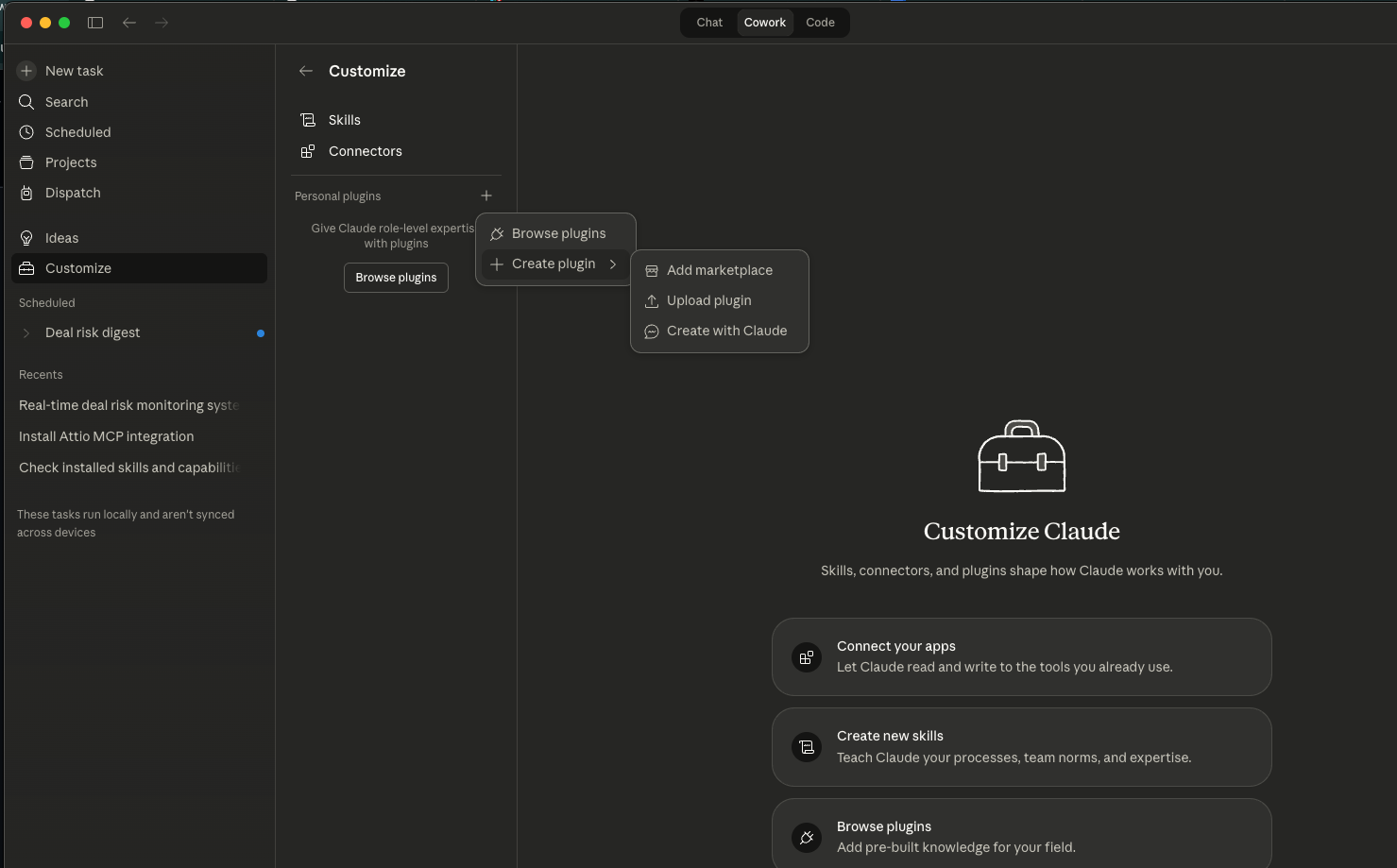
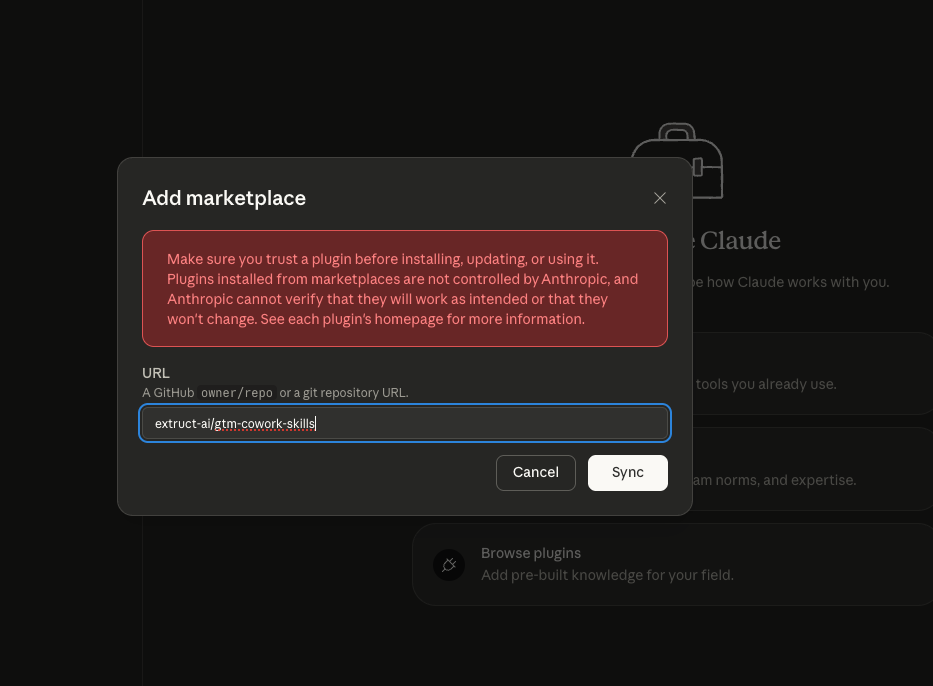
If you prefer Claude Code, the same skills work there: npx skills add extruct-ai/gtm-cowork-skills or /plugin marketplace add extruct-ai/gtm-cowork-skills in the CLI.
To update later, re-add the marketplace or run npx skills update.
2. Connect your integrations
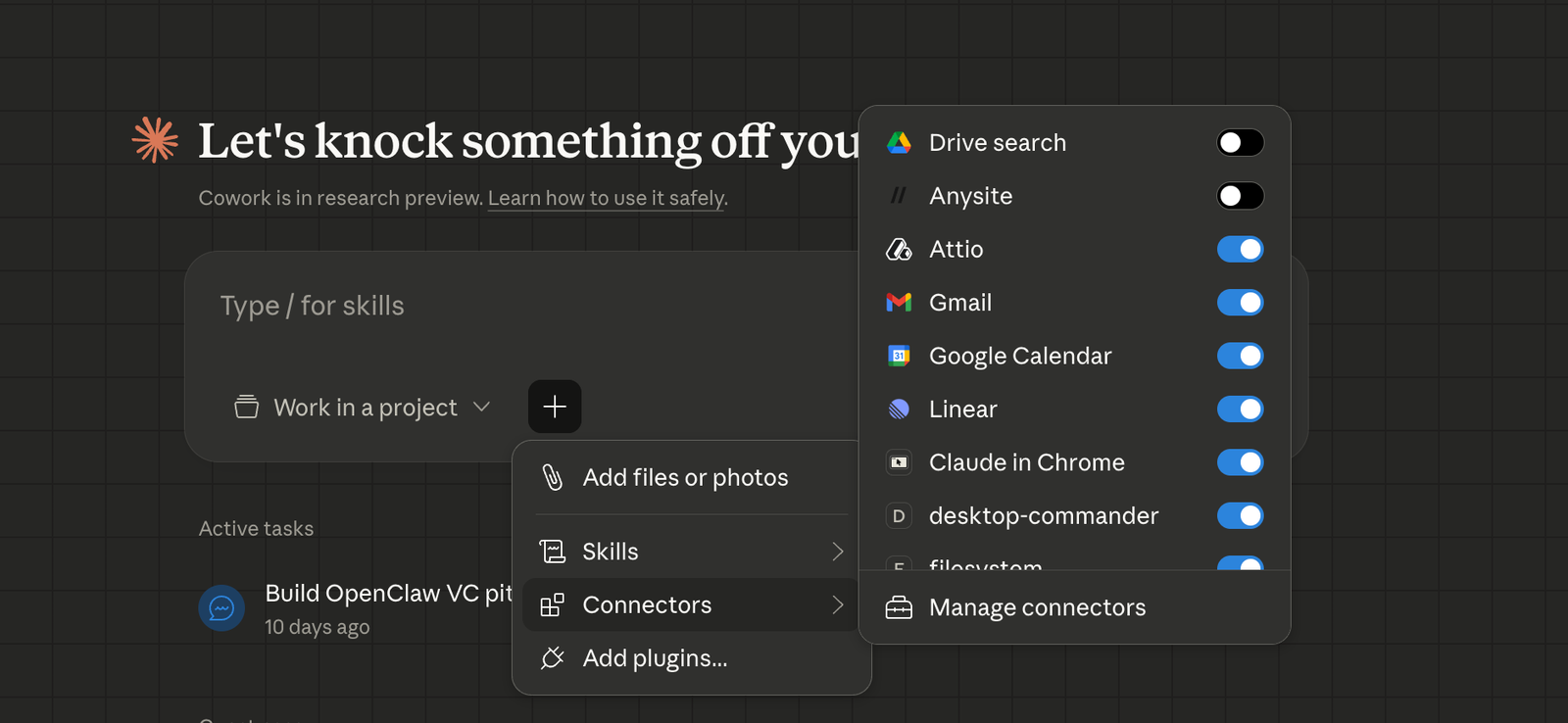
The skills pull live data from your sales stack over MCP. Gmail and Google Calendar are Anthropic-maintained first-party connectors. Toggle them on in Settings → Integrations and authorize in a modal. Attio, Granola, and Anysite ship as vendor-maintained MCPs; Cowork discovers them automatically once you've connected your accounts.
| Integration | Used by |
|---|---|
| Attio | all skills |
| Gmail | meeting-prep, meeting-followup, deal-intelligence, deal-reengagement |
| Google Calendar | meeting-prep, meeting-followup, meddpicc-post-call |
| Granola | meeting-prep, meeting-followup, meddpicc-post-call, deal-intelligence |
| Anysite | company-people-list, user-context |
Extruct is a custom MCP, not a default Cowork integration. Sign up at extruct.ai (free plan, 25 monthly credits), then in Cowork go to Customize → Add custom connector and set:
- Name:
Extruct - Server URL:
https://api.extruct.ai/mcp
You'll be prompted to sign in with your Extruct account the first time a skill invokes it. The skills that don't touch Extruct (meeting-followup, meddpicc-post-call, key-account-plan, deal-reengagement, pipeline-review) will run fine without it.
The headline here: in Cowork the connector setup is a modal and a button. Claude Code supports the same catalog but through /mcp add or a .mcp.json. Fine for a GTM engineer, a wall for an AE.
3. Adapt the prompts
Don't run all nine blindly. Open each skill and read its SKILL.md. The prompts are written around how we run deals: Granola transcripts, MEDDPICC as the methodology, Attio as the CRM. Your setup is going to be different. Different account plan format. Different methodology maybe. Different CRM schema.
Go through the prompts, adjust them, save. The edit loop in Cowork is tight. Describe what's off, Cowork rewrites the skill, re-run it. This is the 15-minute part of install that makes the rest work.
Scheduling
Scheduling is where these skills stop being a chatbot and start being an analyst. Cowork runs the cron on your laptop; Claude Code's equivalent is Routines, which run on Anthropic's cloud. For deal work the laptop cadence is usually what you want. Your laptop is open while you sell, the data never leaves your stack. For anything that needs to fire while you're in a different time zone, push it to Routines.
What to schedule
Not every skill belongs on a cadence. Rough split of the nine:
- Daily at 9am:
/meeting-prep. Brief me on today's meetings. - Daily at 6pm:
/meeting-followup,/meddpicc-post-call. Update deal state from today's calls. - Weekly, Monday at 9am:
/pipeline-review. Flag risk across the pipeline. - Manual only:
/user-context,/company-people-list,/key-account-plan,/deal-intelligence,/deal-reengagement.
Don't schedule the manual ones. An account plan regenerated every day is just noise.
How to set a schedule
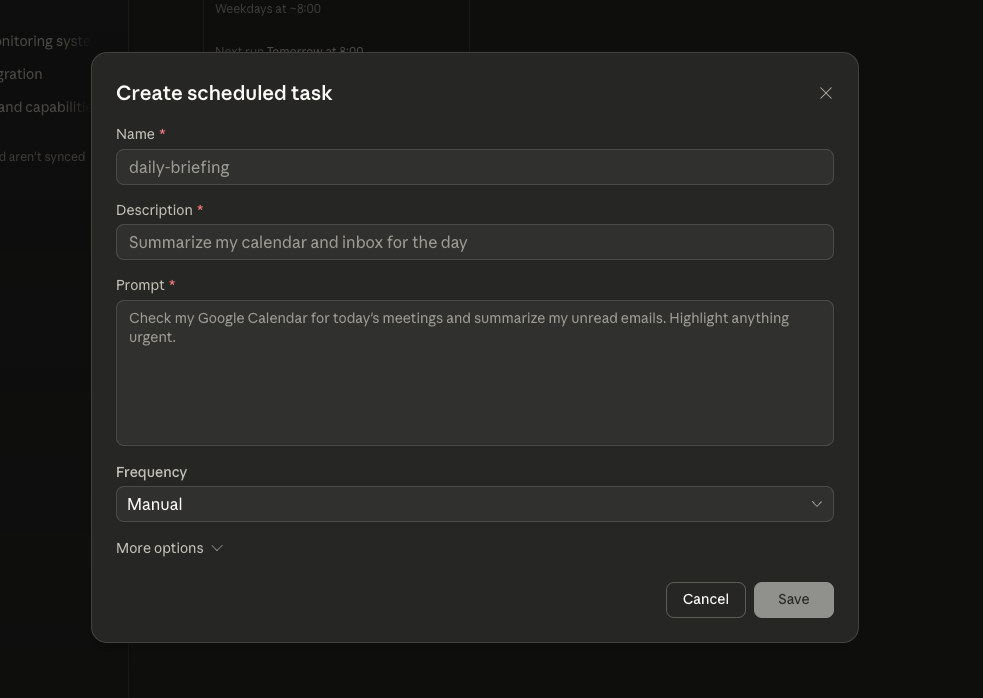
Open the skill in Cowork, click the clock icon, set the cadence. Under the hood it's a cron running on your laptop. The prompt I use to set up the morning brief:
> Every weekday at 9am, run /meeting-prep. Check my Google Calendar
  for the next 8 hours of meetings, pull the Attio deal context for
  each one, check Granola for the most recent transcript with each
  account, and produce a brief I can read in 2 minutes per meeting.
Same pattern for /meddpicc-post-call at 6pm and /pipeline-review on Monday morning.
The prompt is explicit about which connectors to use. Cowork will figure out MCPs on its own, but naming them makes the first runs more reliable. Once a schedule is producing the output you want, you can strip the MCP names and let Cowork route.
The nine skills
Each skill is a markdown file. Prompts below are examples. Use them verbatim or adapt.
/user-context
What it does: one-time setup that builds a context repository of markdown files about your company: products, personas, competitive positioning, voice, methodology. Every other skill reads from these files. Instead of re-explaining your company every session, you save it once and it persists.
Mode: one-time setup. Review when something material changes.
Skip this and every other skill produces generic output.
/meeting-prep
What it does: checks your calendar for upcoming meetings and prepares a brief for each one. Two modes. A reminder brief for existing accounts: what we've discussed, what to bring, what's outstanding. A deep-research brief for net-new companies: growth signals, recent news, talking points.
MCP: Google Calendar, Gmail, Attio, Granola, Extruct
> Check my calendar with Google Calendar and give me a guide for how
  I should prepare for my upcoming meetings, one by one.
Mode: daily, first thing in the morning. → replaces: Crystal, Nooks, pre-call research VAs
/meeting-followup
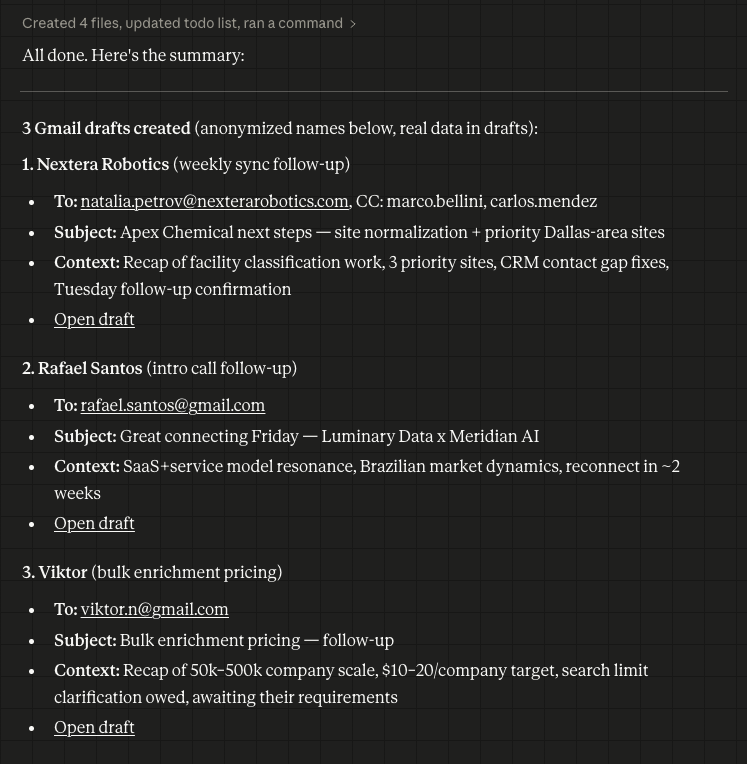
What it does: drafts post-call follow-ups from the Granola transcript and the account plan. References what was actually said in the call, picks the right next step, and tone-matches the relationship stage.
MCP: Granola, Gmail, Attio
Mode: daily, end of day. → replaces: Lavender, Regie.ai follow-up flows
/meddpicc-post-call
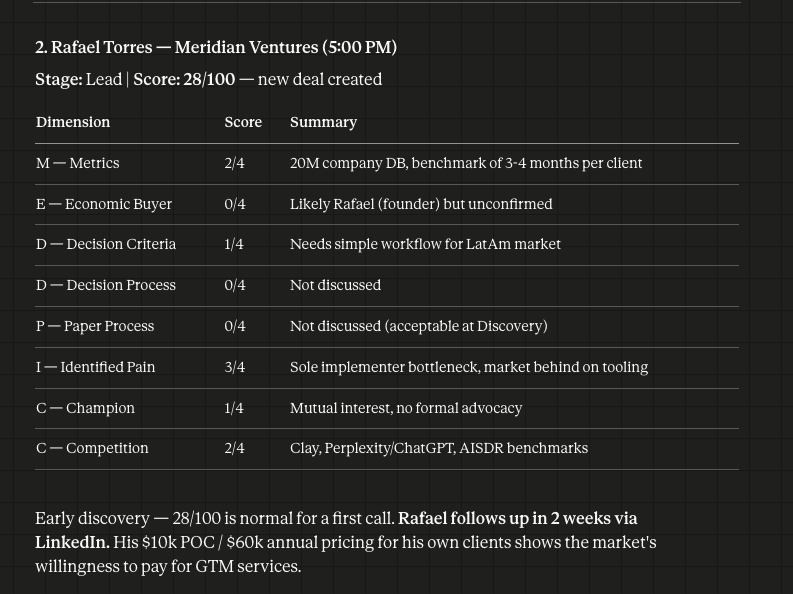
What it does: updates MEDDPICC fields for a deal from the latest transcript. Extracts Metrics, Economic Buyer, Decision Criteria, Decision Process, Identify Pain, Champion, Competition, Compelling Event. Different methodology? Swap the prompt.
MCP: Granola, Attio
Mode: daily, end of day. → replaces: People.ai, Scratchpad, Rattle
/company-people-list
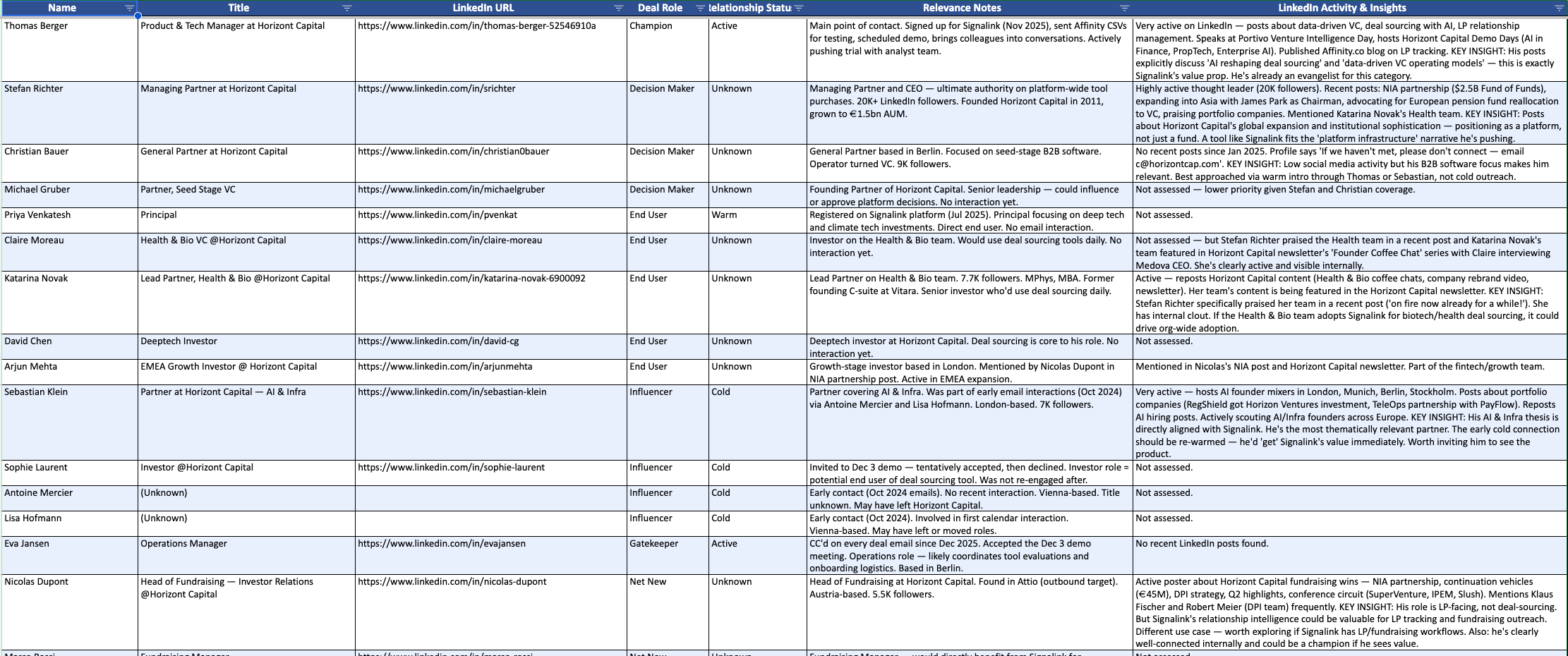
What it does: builds an org chart for an account using internal signals (who's shown up on calls, who's sent emails) and external data (LinkedIn lookups via Extruct and Anysite). Outputs a CSV of each person, their role in the buying committee, what they've said. Identifies who you still need to meet.
MCP: Attio, Extruct, FullEnrich, Anysite
Mode: manual. Run when you're prepping an expansion or multi-threading a deal. → replaces: ZoomInfo, Lucidchart, The Org
/key-account-plan
What it does: extends the org chart into a full account plan. Pulls from MEDDPICC state, conversation history, and the people list to produce a plan you can share with CSMs, solution engineers, or a hand-off. This one is a template. Plug in your company's account-plan structure and it fills the template from deal data. Here's the template we use.
MCP: Attio, Granola, Google Docs, Gmail
Mode: manual, at deal inflection points: QBR, expansion, hand-off. → replaces: Altify, DemandFarm, Kapta, Prolifiq
/deal-intelligence
What it does: chat with any deal. "What did the CFO say about ROI timeline?" "Who's the blocker on procurement?" "What objections came up in the demo?" Answered from the actual deal context, not a summary. Most useful when you inherit a deal, pick up a stealth deal, or need to get back on the track after being out.
MCP: Granola, Extruct, Attio, Google Calendar, Gmail
Mode: manual, on demand. → replaces: Gong, Chorus, Clari Copilot, Avoma
/deal-reengagement
What it does: drafts a re-engagement email for a deal that's gone quiet four or more months. Pulls the latest product and marketing updates from your context file, finds the most relevant thread, and writes an email that references what's changed on your side, not "just checking in."
Other outbound emails are better left personalized by a human. This skill earns its keep specifically on re-engagement, where the hard part is finding a legitimate reason to reach out at all.
MCP: Gmail, Attio
Mode: manual. → replaces: nothing cleanly. This is a gap in the existing stack.
/pipeline-review
What it does: flags deal risks in real time, not after the QBR. Surfaces them as they emerge: key stakeholder went quiet, no progress on next steps, competitor mentioned in the last call, velocity slowing. The goal is to see the warning on day eleven, not at the weekly forecast meeting.
MCP: Attio, Granola, Google Calendar, Gmail
Mode: weekly, Monday morning. → replaces: Clari, Aviso, InsightSquared
What this is really about
The bet behind these repos isn't "AI replaces SDRs." It's simpler. The artifacts your sales org keeps producing (call notes that die in Salesforce, account plans nobody updates, MEDDPICC fields that sit empty) exist in that state because there was no cheap way to generate them from raw conversation. The methodology was fine. The cost of execution was too high.
So: fork the repo, rewrite the prompts in your company's voice, wire them to your MCP setup. The strategy is still yours. The execution runs in the background.
github.com/extruct-ai/gtm-cowork-skills
If you want the first half of GTM covered too: github.com/extruct-ai/gtm-skills.
