 Danny Chepenko
Hey, Danny here.
Over the last few weeks I've been deep into Claude Code, and I'm confident it's the most powerful tool for GTM I've used. Not because of what it can do out of the box — but because of what happens when you teach it how you work.
Claude Code is Anthropic's agentic coding tool. It started as a CLI that runs in your terminal, but now it's also available as a standalone desktop app and inside IDEs. You give it a task, and it actually executes it: writes scripts, calls APIs, scrapes websites, processes files, creates spreadsheets. It's not a chatbot you copy-paste from. It does things directly on your machine.
Anthropic also recently launched Cowork — a separate product that brings the same agentic architecture to the Claude Desktop app, but for non-coding knowledge work. No terminal required. It runs locally in an isolated VM, takes on multi-step tasks, and loops you in before taking significant actions. "Cowork is less a new feature than it is a new way of working." If you've used Claude Code for GTM and wondered what it would look like without the command line — that's where Cowork is heading.
It comes with built-in tools — read files, write files, run shell commands, search your codebase. But you can also connect external services: CRMs, enrichment APIs, email sequencers, research tools. Claude Code calls them the same way it calls anything else — you describe what you need, it figures out which tool to use.
But here's the thing: tools alone aren't enough.
Skills: Your Methodology, Packaged
A Skill is a set of instructions — written in plain English, stored as a Markdown file — that teaches Claude Code how to approach an entire category of work. Not what to do in a single moment, but how to think about a type of task.
Skills aren't code, but playbooks. If you can describe how you do your job in a structured document, you can create a Skill.
The GTM Skills Pipeline
We open-sourced the full set of skills we use for outbound: github.com/extruct-ai/gtm-skills
Install in one command:
npx skills add extruct-ai/gtm-skills
Or via Claude Code's plugin manager:
/plugin marketplace add extruct-ai/gtm-skills
/plugin install gtm-skills
Skills install to ~/.claude/skills/ — install once, use across all your projects. The only required credential is an Extruct API token (free trial with 100 credits at extruct.ai). Skills that don't call the Extruct API — context-building, hypothesis-building, email-prompt-building, email-generation — work without it.
Here's the full set, organized by pipeline stage. Each one reads from the previous step's output. The whole thing chains together. You don't need to follow a fixed sequence — each skill works independently. But if you want a starting point, just describe what you need:
I'm building www.example.com.
One of my customers is www.customer.com,
they use us to score suppliers.
Find similar companies and plan a campaign.
This triggers plan mode — Claude will research, ask clarifying questions, and propose a step-by-step campaign before executing. Here's what each skill does under the hood.
Context & Research
/context-building
Everything starts here. We start by building a context repository of markdown files that capture everything about your company: products, personas, competitive positioning, voice and tone. Instead of copy-pasting the same company context into ChatGPT every time you start a new session, you save it once as files and tell Claude Code to read them. The context persists across sessions. It compounds.
One markdown file per company that captures product info, ICP, voice rules, win cases, proof points, campaign history, and DNC lists. Every other skill reads from this file.
Four modes: create a new context, update an existing one, extract signals from a call recording, or import campaign results back in.
> Build a company context for Extruct. Here's our landing page: extruct.ai
/hypothesis-building
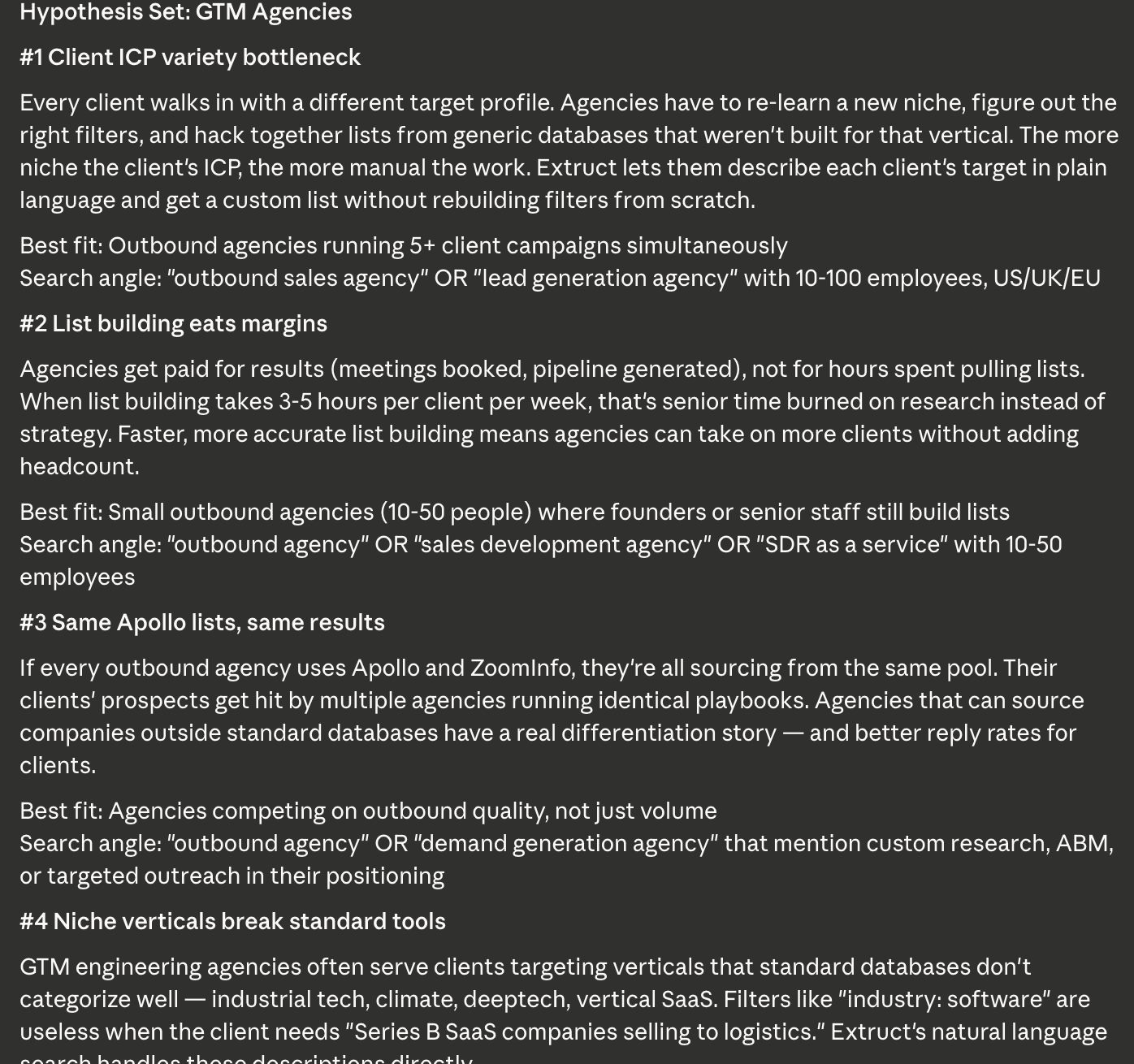
Generate testable pain hypotheses from your context file. No API keys needed — pure reasoning. It reads your ICP, win cases, and product knowledge, then outputs a hypothesis set with search angles that directly guide list building.
> Help me create hypotheses for selling to GTM agencies — outbound agencies,
  GTM engineering shops, and others.
/market-research
When hypotheses aren't enough and you need real industry education. Uses deep research APIs to research a vertical's pain points, then distills findings into a numbered hypothesis set. Pure research — decoupled from email generation.
> Research pain points in the search fund vertical. What are they struggling
  with in deal sourcing?
List Building & Enrichment
/list-building
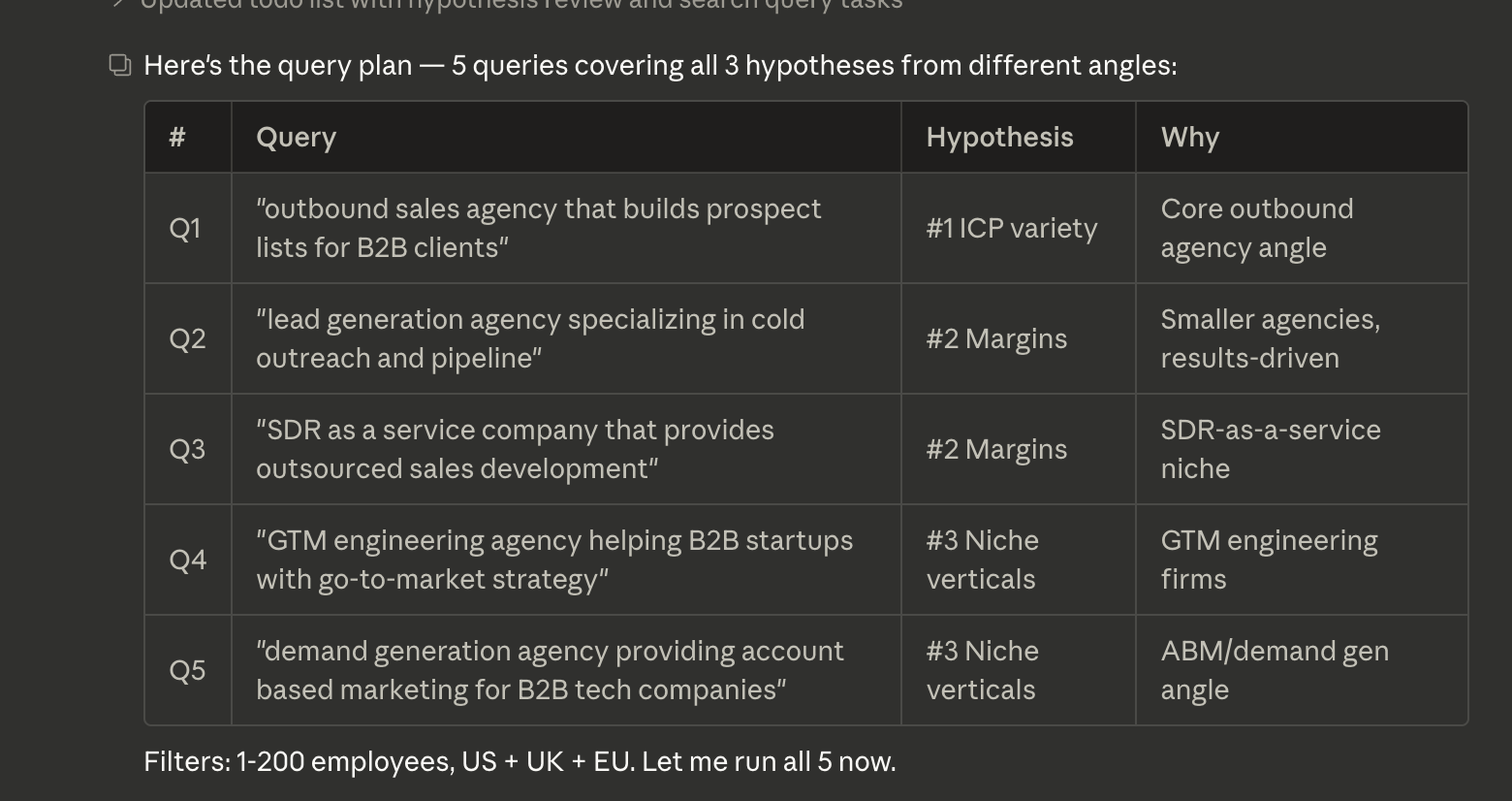
Build company lists using the Extruct API. Three methods based on a decision tree: lookalike search (you have a seed company from a win case), semantic search (broad description), or deep discovery (qualified, criteria-scored results). 200-500 companies in seconds.
> Find 200 companies similar to True Capital. Focus on mid-market VC firms
  with 50-200 portfolio companies.
/table-creation
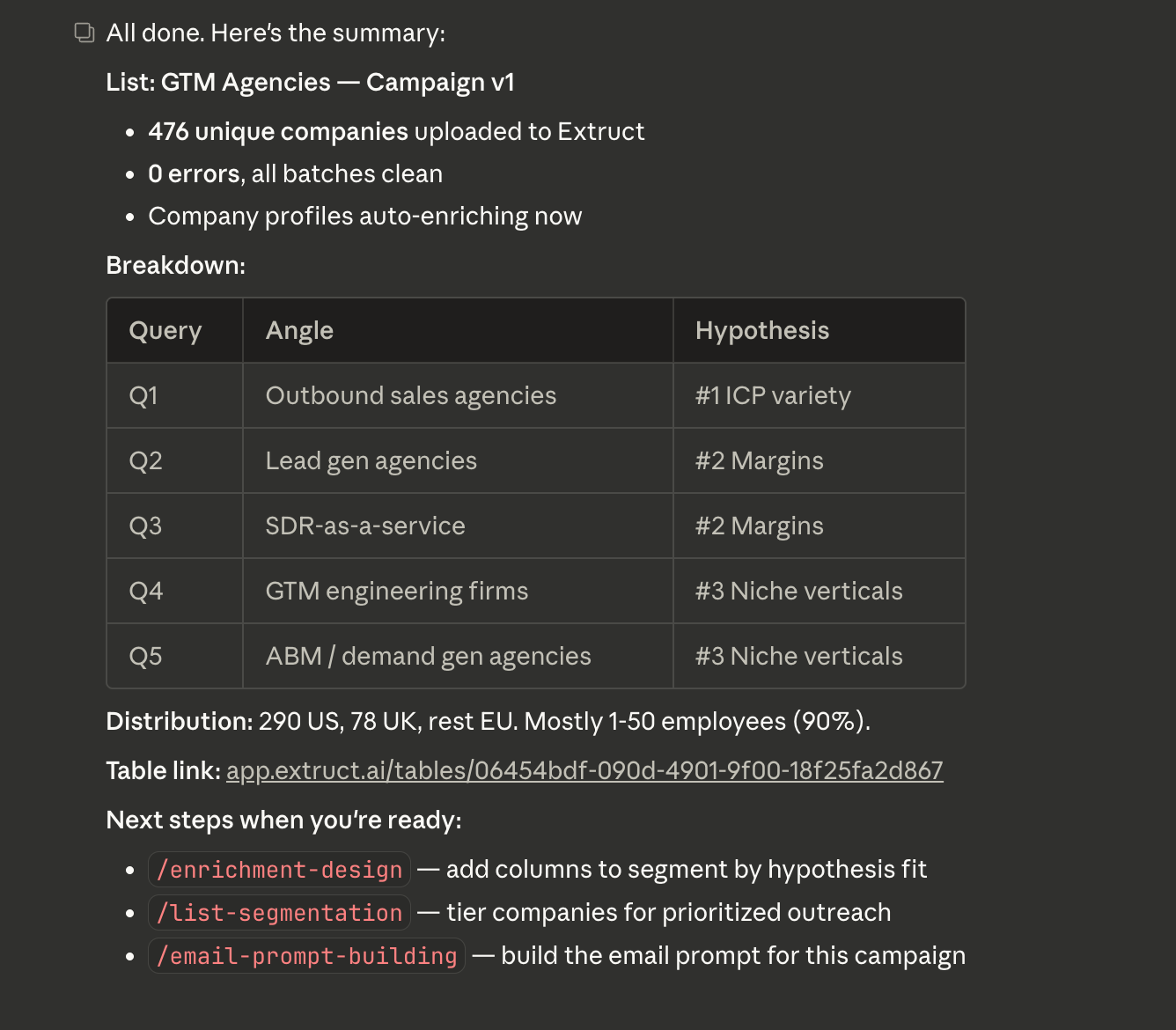
Upload companies to an Extruct table. Handles the full flow: parse input (CSV, pasted list, or structured data), create or reuse a table, upload domains in batches, add columns, trigger enrichment.
> Create a new Extruct table called "GTM Agencies Q1" and upload this CSV.
/enrichment-design
Bridge the gap between your hypotheses and actual enrichment. Two modes: segmentation columns (score hypothesis fit per company) and personalization columns (company-specific hooks for emails). You design the columns interactively, then hand them off to list enrichment.
> Based on our hypothesis set, what data points should we research about
  each company? I need both segmentation and personalization columns.
/list-enrichment
Run enrichment columns on your Extruct table via the API. Takes the column configs from enrichment-design and executes them — funding data, vertical classification, tech stack, whatever you designed. Monitors progress and lets you review results.
> Enrich table "GTM Agencies Q1" with the columns we just designed.
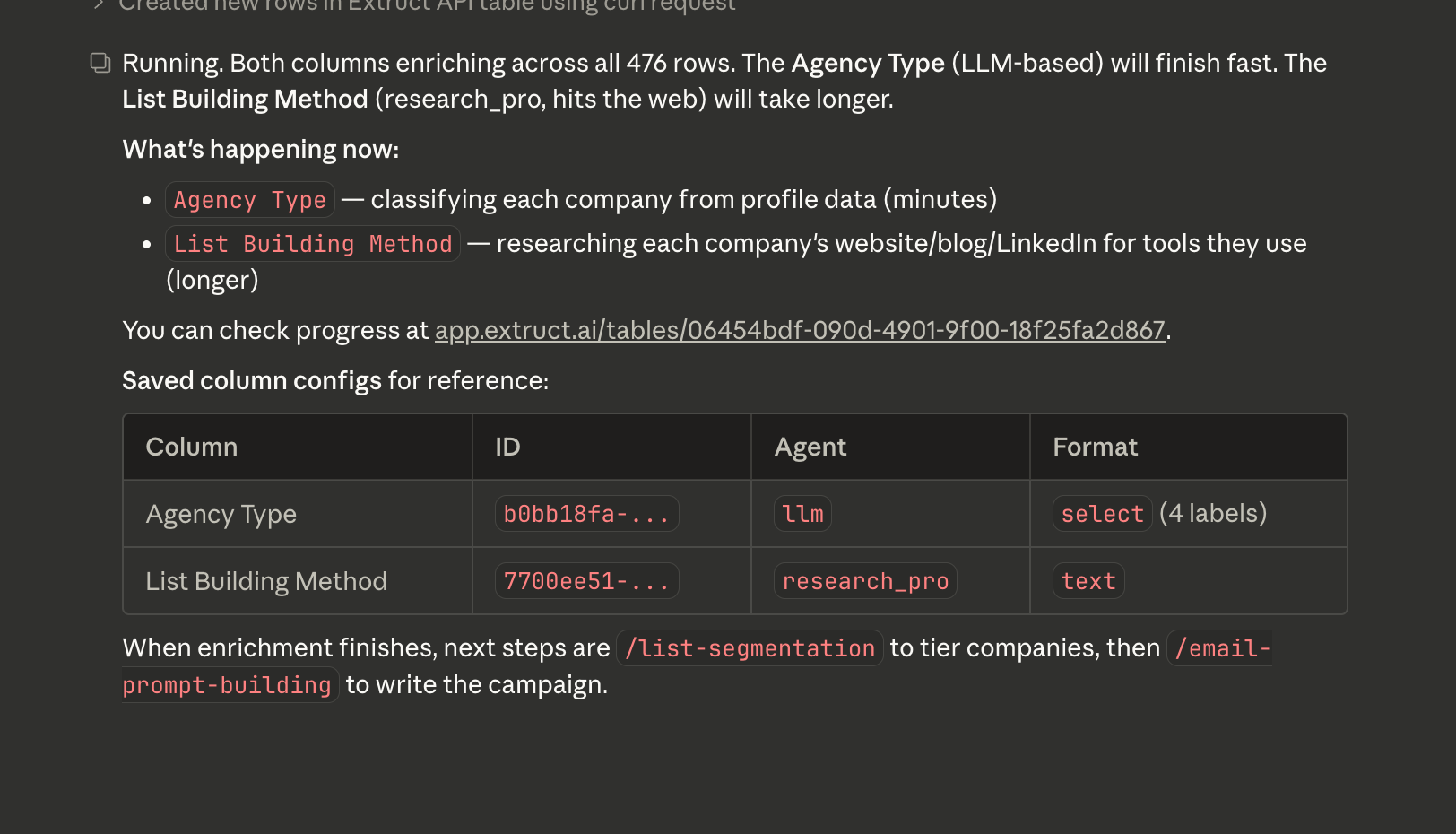
/list-segmentation
Take the enriched table and your hypothesis set, then segment companies by hypothesis fit and assign tiers based on data richness and signal strength. Tier 1 gets individual attention. Tier 2 gets templates. Tier 3 gets deprioritized.
> Segment and tier the GTM Agencies table against our hypothesis set.
People & Contact
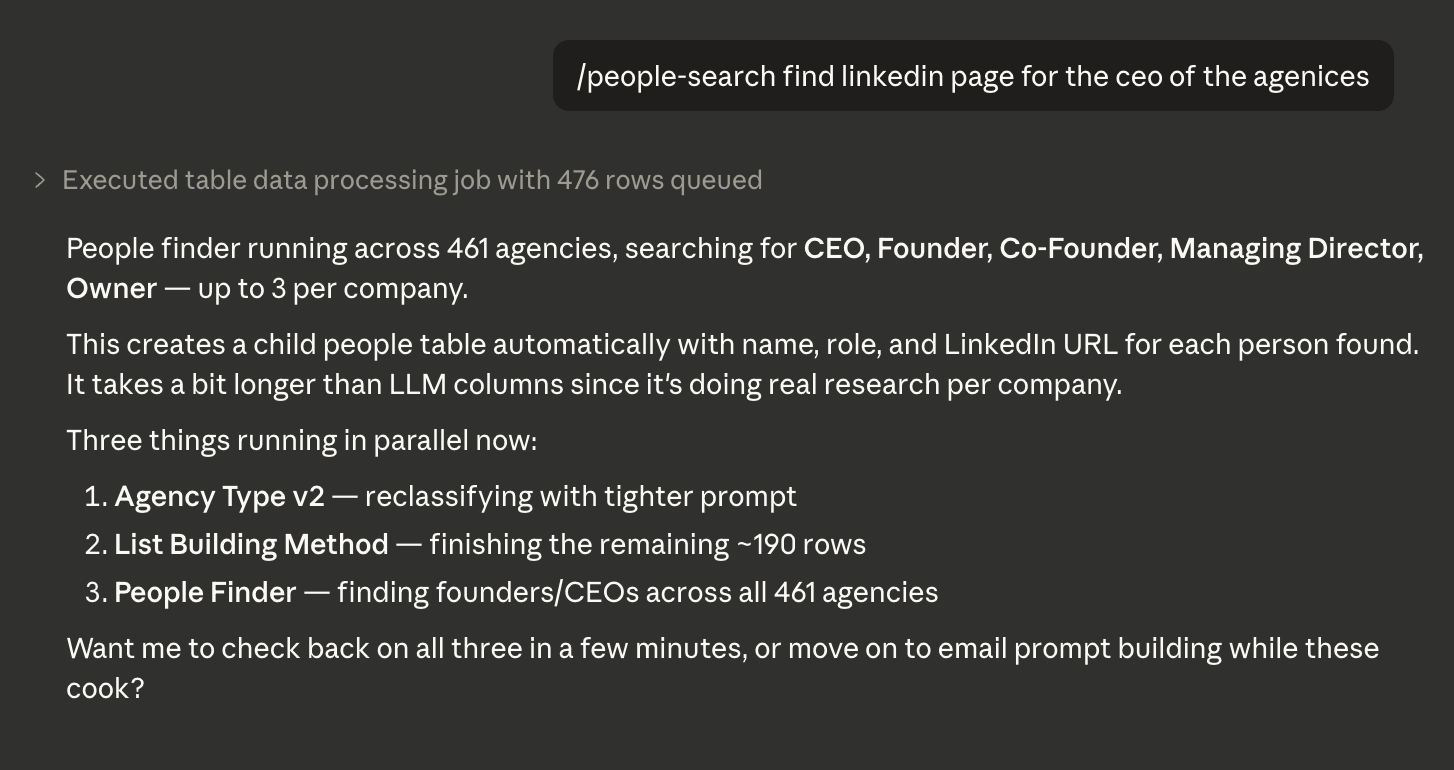
/people-search
Find decision makers at target companies using Extruct's people index. Takes a company table, adds a people finder column, and produces a linked child table with names, roles, and LinkedIn URLs. No external API credits — it's built into Extruct.
> Find Heads of Growth and VP Sales at the Tier 1 companies.
/email-search
Get verified emails and phones for the contacts from people-search. Runs profiles through Prospeo and/or Fullenrich. Supports single-provider and waterfall modes. Outputs a contact CSV ready for email generation.
> Get verified emails for all the contacts we found. Use waterfall mode.
Email & Sending
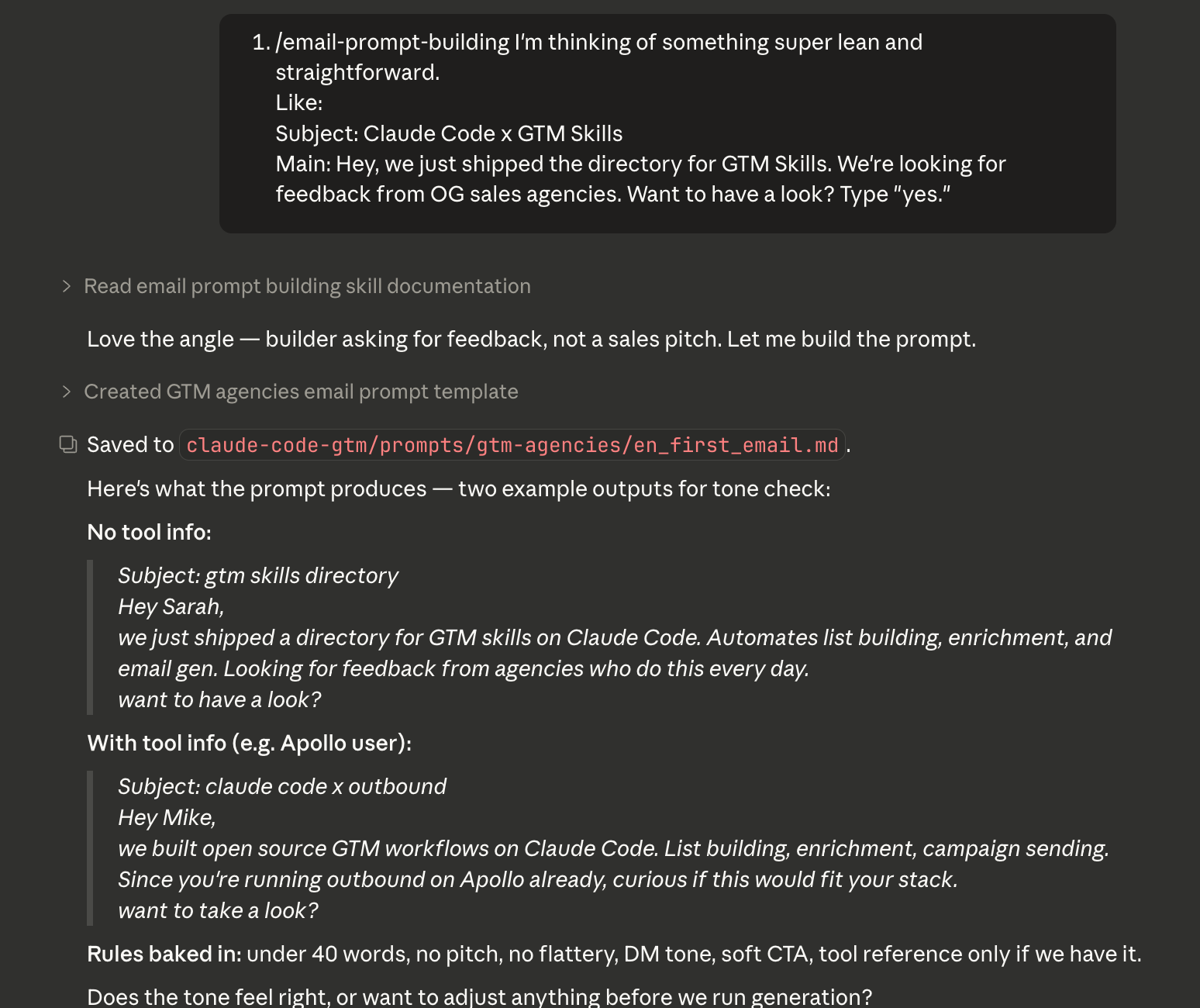
/email-prompt-building
Build a self-contained email prompt template for a campaign. Reads your context file (voice, value prop, proof points) and campaign research (hypotheses, data points), then synthesizes everything into a single prompt. One prompt per campaign. All the reasoning happens here — the email generator just runs it.
> Build an email prompt for the GTM agencies campaign. Use the hypothesis
  set and segmentation data we have.
/email-generation
Run the prompt template against your contact CSV. This skill is a runner, not a reasoner — all strategic decisions were made by email-prompt-building at build time. It generates one email per row, personalized using the enrichment columns and contact data.
> Generate emails for the Tier 1 GTM agencies contacts using the prompt
  we just built.
/email-response-simulation
Simulate a skeptical buyer reading your cold email. Builds a full prospect "world" from their LinkedIn and company data, defines their professional reality (KPIs, pain points, inbox behavior), then runs a roast — emotional reaction first, business evaluation second. One prospect at a time, Tier 1 only.
> Review the email for Sarah Chen at Belkins. Would she actually reply?
/campaign-sending
Last mile. Upload finalized emails to Instantly for sequencing and sending. Maps fields to Instantly's lead schema, creates or finds campaigns, uploads leads with dedup, and gives you a pre-send verification checklist. I always manually verify before hitting send.
> Upload the Tier 1 emails to Instantly. Campaign name: "GTM Agencies - March"
The Feedback Loop
After a campaign runs, results feed back into /context-building. What worked, what didn't, which hypotheses converted — all of it goes back into the context file. Next campaign starts smarter than the last one.
This is the part most GTM teams miss. They start fresh every campaign, losing context across tools and people. With skills, every session builds on the previous one. The knowledge compounds.
How It All Connects
Skills communicate through markdown files and Extruct tables. Each skill reads from the previous step's output and writes its own. The company context file is the spine — every skill reads from it. Everything is human-readable, so you can inspect and edit any step.
The context file is read by 6+ downstream skills — it's your single source of truth for voice, ICP, and proof points. The hypothesis set flows through even more — enrichment-design, segmentation, email prompts all read it. And every intermediate file lives on disk as markdown or CSV, so you can always inspect, edit, or override before the next step runs.
Claude Code connects to external services through API keys and MCP servers — Extruct for company data, Perplexity for research, Prospeo and Fullenrich for contact enrichment, Instantly for sending. You set the keys once and every skill that needs them picks them up automatically.
What Claude Code Actually Does Well for GTM
Context compounds. GTM teams start fresh every campaign, losing context across tools and people. Claude Code keeps everything: your ICP definitions, past campaigns, what worked, what didn't. Every session builds on the last one.
Agentic harness. You don't need to source an orchestration vendor. You write a skill, chain it with another skill, and you have a pipeline. Put the tools on top.
Control. If I built it, I trust it. I see every step, every prompt, every output.
What's Missing Today
Deep CRM hygiene. Relationships need to be correct, data points filled. The GTM agents need to operate on top of clean infrastructure. A lot of AI GTM products solve the last mile before fixing the foundation.
Collaboration and team memory sharing. The magic of Claude Code is that it fetches the right documents without you having to specify them. But that magic only happens inside the terminal — no way to share context across a team. Yes, there's GitHub, but I want to see the context trails: which files get accessed together, which skills get chained, what knowledge compounds.
Observability. It's tempting to give Claude Code the decision on what's junk, and auto-update HubSpot. But if you're talking about a big org with multiple workflows, you need access controls, testing, audit trails. Zero configuration also means zero documentation and zero ownership by default.
Claude Agent SDK will 10x in 2026. A new ecosystem of "Claude Code wrappers" will emerge, just like ChatGPT wrappers in 2023. But this time we don't need a better UX — we need a better agentic experience.
Things are changing rapidly — will keep you posted.
Resources
Useful repos and tools for your Claude Code setup:
- Anthropic Official Skills — Canonical skills from Anthropic (docx, pptx, xlsx, PDF creation, and more).
- Claude Code Guide (Cranot) — Most complete community reference. Auto-updates every 2 days. 2,360+ stars.
- Awesome Claude Code — The definitive community list. Slash commands, CLAUDE.md files, agents, skills, hooks, plugins.
- Skills.sh — Marketplace of 55,000+ installable skills. Search for marketing-relevant ones like copywriting, SEO audit, social content.
- AI Templates — Open-source library of 30+ pre-built Claude Code agents, skills, commands, hooks, and MCP configs.
- Marketing Skills (Corey Haines) — CRO, copywriting, SEO, analytics, email sequences, growth engineering skills.
- Context7 — MCP server that feeds Claude Code up-to-date documentation for any library or framework.
